Open source · MIT · Python CLI · pipx installable

The SME your team never had.

Kluris turns your AI agents into a subject matter expert that never sleeps and never quits — built collaboratively with you, one approved entry at a time.

Customizable brains · Human-curated · Git-backed · Free forever

Agents forget

Every new session starts from zero. Your codebase is re-learned every morning.

Docs are for humans

Wikis, Notion, Confluence — agents can't search them, link them, or write back.

Senior devs leave

The "why" behind every decision walks out with them. A year later nobody remembers.

Scroll

Beat 1 · Set up

Install kluris. Create a brain.

A brain is a git repo of curated markdown that every AI agent on your team can read as a subject matter expert. One command to install. One wizard to create your first one.

macOS Terminal
$ brew install pipx
$ pipx ensurepath
$ pipx install kluris
Linux Terminal
$ python3 -m pip install --user pipx
$ pipx ensurepath
$ pipx install kluris
Windows Terminal
> pip install pipx
> pipx ensurepath
> pipx install kluris
kluris create — interactive wizard Terminal
$ kluris create

Brain name: acme-brain
What does this brain cover? Shared brain for ACME projects
Location: ~/Projects/acme-brain
Brain type [project-group, personal, product, research, blank]: project-group
Git setup [1=local, 2=with remote, 3=no git]: 1
Default branch: main

Install specmint companions for this brain?
  [1] specmint-core  (spec-driven-development)
  [2] specmint-tdd   (spec-driven-development + TDD focus)
  [3] both           [4] skip
Choice: 3

   Created acme-brain (project-group · 3 lobes)
   Git initialized on main
   Registered acme-brain
   Installed /kluris-acme skill for 8 agents
   Bundled specmint-core + specmint-tdd companions

Next: open any project in your AI agent and
      type /kluris-acme learn this service
The folder kluris just created · project-group defaults
acme-brain/
├── kluris.yml              # gitignored — your local config
├── brain.md                # root directory, auto-generated
├── glossary.md             # domain terms, hand-edited
├── README.md               # usage guide
├── .gitignore
├── projects/
│   └── (your neurons go here)
├── infrastructure/
│   └── (your neurons go here)
└── knowledge/
    └── (your neurons go here)

Scaffolded defaults for the project-group brain type. You add, rename, or remove lobes as your team grows.

Every brain is a git repo. Your knowledge is markdown. Nothing is magic.

Beat 2 · Teach

Teach the brain what your team knows.

Open your AI agent in a project. Two steps make every future session smoother — first wire kluris in so every coding agent that lands in this repo finds the brain, then have the agent learn the project end-to-end. Lobes are folders you create to group related ideas — one per concern. Neurons are the markdown files inside them. You approve every neuron before it lands.

Step 1 · /kluris-acme setup

Wire kluris into the project.

Drop a small pointer into the project's CLAUDE.md and AGENTS.md. The agent surveys both, creates them if missing, or reformulates a stale pointer it finds. Same ## Knowledge base block in both files.

  • Every coding agent in the repo finds the brain on the way in
  • Same block in both files — no shim, no indirection
  • Idempotent — re-run any time
In your AI agent, opened on a project (Claude Code, Cursor, Windsurf, …) Agent
> /kluris-acme setup this project

Surveying CLAUDE.md and AGENTS.md...

CLAUDE.md: missing — propose creating
AGENTS.md: missing — propose creating

Proposed ## Knowledge base section
(same in both files):
──────────────────────────────────────
  ## Knowledge base

  Read and write to the **acme** brain through kluris
  (never edit brain files by hand). Use the
  /kluris-acme skill — search, learn, remember, create.
──────────────────────────────────────

[a]pprove  [e]dit  [s]kip: a

 CLAUDE.md created
 AGENTS.md created (same block)
In your AI agent, opened on a project (Claude Code, Cursor, Windsurf, …) Agent
> /kluris-acme learn everything
                      about this project

Reading: src/, package.json, README,
schema/, .github/, docs/...

Proposing 12 neurons across 4 lobes:
   projects/btb-core/auth-flow.md
   projects/btb-core/data-model.md
   projects/btb-core/api-shape.md
   infrastructure/docker-builds.md
   knowledge/raw-sql-no-jpa.md
  ... 7 more

Walking through, one at a time:

Neuron 1 / 12
Proposing: projects/btb-core/auth-flow.md
──────────────────────────────────────
# Auth flow

Keycloak OIDC. Frontend obtains JWT,
passes it to backend as Bearer token.
Backend validates via JWKS. Refresh
at 80% TTL.

Related: [clerk-vs-keycloak.md]
──────────────────────────────────────

[a]pprove  [e]dit  [s]kip: 
Step 2 · /kluris-acme learn

Learn everything about this project.

Point the agent at the whole project and let it propose neurons across every lobe — one at a time, with a preview of every piece before it is written.

  • Approve, edit, skip, or change the target lobe
  • Nothing is written without your sign-off
  • The agent infers related neurons automatically

Agent = inside your AI coding agent, opened on a project. Terminal = in your shell.

Beat 3 · See

See the whole brain.

One command. A local, interactive map you can share.

kluris mri — one self-contained HTML file Terminal
$ kluris mri

MRI complete — brain-mri.html
  51 neurons, 491 synapses
  → file:///home/user/acme-brain/brain-mri.html

Open it in any browser. Commit it, email it, drop it
in Slack — it runs anywhere, with no server.
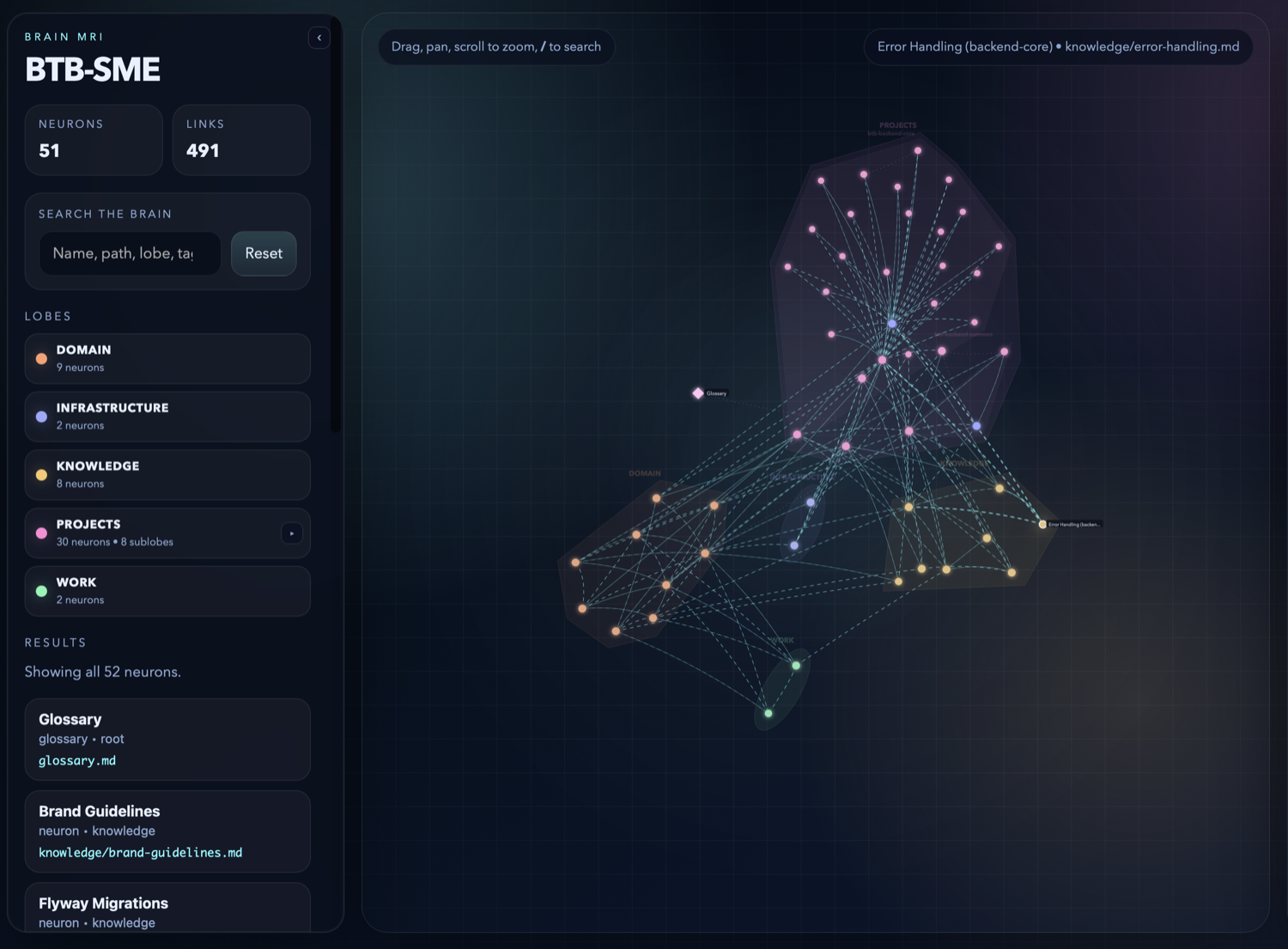
kluris mri overview — lobe panel with neuron counts, live stats (51 neurons, 491 links), search box, and the whole brain as coloured clusters with dashed synapse lines
The overview — lobes as clusters, neurons as nodes, synapses as the lines between them.

Live counts (51 neurons · 491 synapses), a lobe breakdown you can collapse and filter, and a fuzzy search across names, paths, lobes, and tags. Click a lobe to isolate it; click a node to open it.
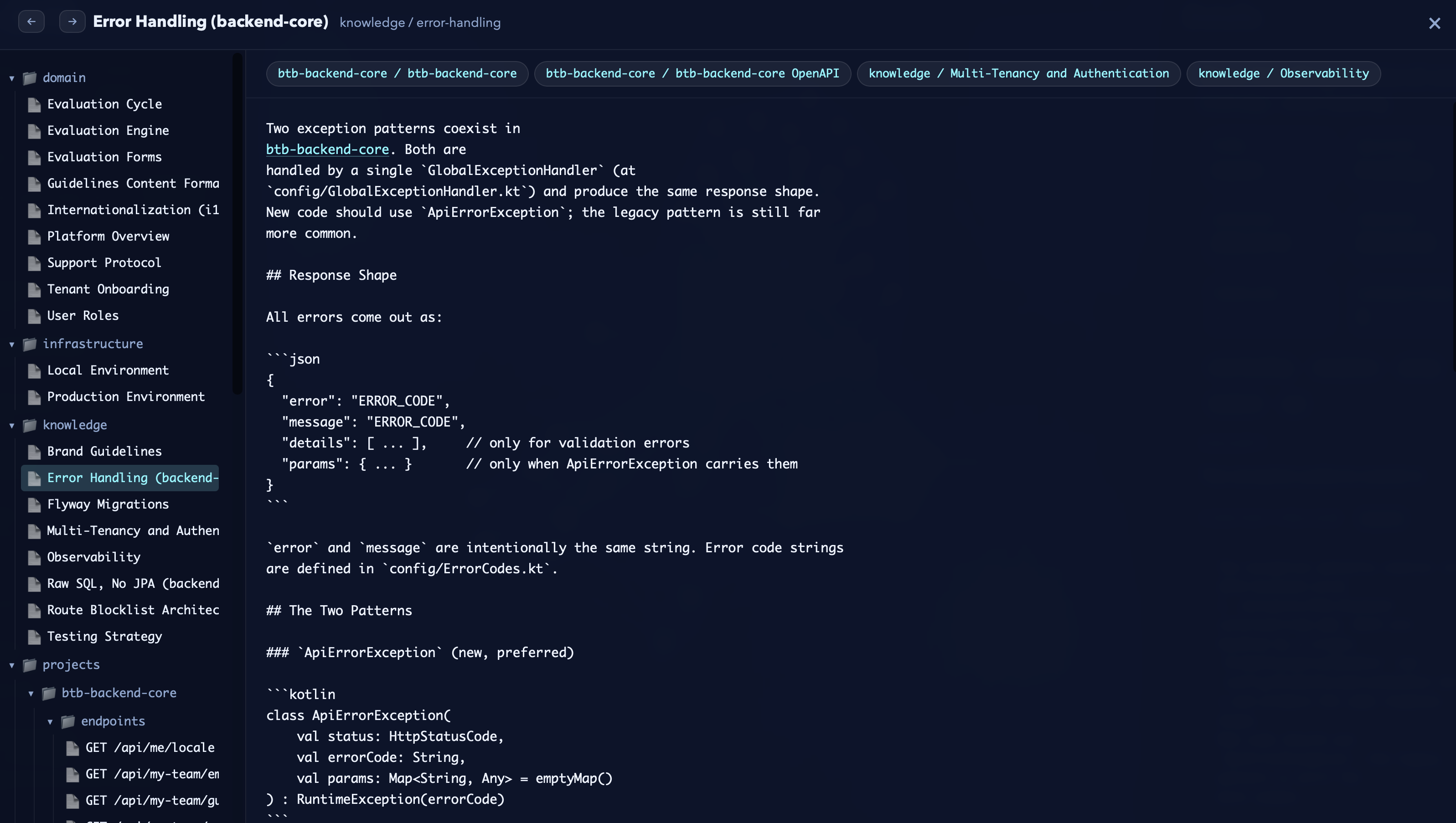
kluris mri inspector — a neuron's rendered markdown on the right, related-neuron tabs along the top, and the full brain tree in the left panel for jumping around
The inspector — rendered markdown on the right, related neurons as tabs, the full brain tree on the left.

One click on any node opens its neuron, fully rendered, with related-neuron tabs across the top so you can walk a topic in seconds. This is what agents see — now visible to you.

The MRI is a single self-contained HTML file — no server, no account, no external calls. Run kluris mri, open it in any browser, and you've got the whole brain to explore.

It's a tool for three audiences at once: you (spot isolated neurons that should be cross-linked), your team (shared mental model of what we know), and new hires (five-minute onboarding instead of five days of spelunking). Since it's just HTML, you can commit it, email it, or drop it in Slack.

Lines between neurons are synapses — cross-links agents follow to load related context. Because the brain is a pre-digested snapshot, agents spend far fewer tokens orienting to a codebase than without one.


Beat 4 · Use

Ask the brain. Get grounded answers.

Every agent on your team can search and query across the brain. The agent shows you exactly which neurons it read — no hallucinations, no vibe.

SEARCH semantic + keyword lookup In your AI agent · in a project
> /kluris-acme search auth flow

Found 3 neurons:
  projects/btb-core/auth-flow.md       ★★★
  knowledge/jwt-rotation.md            ★★
  infrastructure/keycloak-setup.md     

Run `/kluris-acme open auth-flow.md` to read one.
WHAT DO WE KNOW natural language Q&A across the brain In your AI agent · in a project
> /kluris-acme what do we know about Docker?

Reading:
  infrastructure/docker-builds.md
  infrastructure/environments.md

You build multi-stage Dockerfiles with
BuildKit. Images go to ghcr.io/zeespire/.
Prod uses Coolify on Hetzner with Cloudflare
Tunnel (zero public ports).

+ Pair · Specmint

Plan with context you didn't have to re-derive.

Kluris is the brain. Specmint turns a feature request into a persistent spec built from deep research and iterative interviews. Use them together and the research phase starts half-done — grounded in your code and the knowledge your team already agreed to.

1 · Shorter research

Forge reads your repo and consults the brain. Decisions the team already made don't get re-discovered from the code.

2 · Sharper interviews

Not "what's your auth?" — but "your brain says Keycloak for cost — should GitHub OAuth live behind it as an IdP, or beside it?"

3 · Traceable decisions

Every entry in the resulting SPEC.md cites the neuron that backs it. A week later you can still tell why.

/kluris-acme — write a spec, grounded in code + brain In your AI agent · in a project
> /kluris-acme write a spec to add OAuth sign-in with GitHub

Phase 1a · Codebase research
   Reading src/auth/ (14 files)
   Reading config/GlobalExceptionHandler.kt

Phase 1b · Brain research   ← the kluris bit
   /kluris-acme what do we know about auth
     knowledge/auth-decisions.md
     projects/btb-core/auth-flow.md
     knowledge/jwt-rotation.md

Phase 2 · Interview
  Q1. Brain says you chose Keycloak for cost.
       Should GitHub OAuth live behind Keycloak
       as an IdP, or alongside it?
  Q2. Auth-flow neuron says refresh-at-80% TTL.
       Same cadence for the GitHub session?

Phase 3 · Spec written
   .specs/github-oauth-signin/SPEC.md
   3 phases · 14 tasks · 4 decisions logged
   Every decision references a neuron

Enable Specmint Companions

specmint-core

Spec-first

Research · Interview · Spec · Implement. The workflow shown above.

kluris companion add specmint-core bundled with kluris

specmint-tdd

Red · Green · Refactor

Same forge flow, with strict TDD — a failing test before any implementation.

kluris companion add specmint-tdd bundled with kluris

Enable companions per brain; Kluris copies only the bundled SKILL.md and references it from the generated /kluris-<name> skill.

Beat 5 · Grow

Your brain grows with your team.

Add lobes, add neurons, keep going — all through the agent.

/kluris-acme · add a new lobe In your AI agent · in a project
> /kluris-acme add a compliance lobe for SOC2
         and GDPR notes

Proposing new lobe: compliance/
   will create compliance/map.md
   will link into brain.md

[a]pprove  [c]ancel: 
/kluris-acme · add a neuron in the new lobe In your AI agent · in a project
> /kluris-acme remember that SOC2 audit evidence lives in
         the compliance-evidence/ bucket, rotated yearly

Proposing: compliance/soc2-evidence.md
──────────────────────────────────────
# SOC2 audit evidence

Evidence artifacts live in the `compliance-evidence/`
S3 bucket. Rotation is annual. Access is restricted
to the security team.
──────────────────────────────────────

[a]pprove  [e]dit  [s]kip: 

Lobes are folders, neurons are markdown files inside them — but you don't create them by hand. Ask the agent. It proposes the structure, shows you the diff, and writes it only after you approve. Nesting works the same way: "add a sublobe for the endpoints of acme-api" and the agent puts it in the right place.

The loop closes. After every shipped feature — bug fix, deploy, env-var change — ask /kluris-acme remember what we worked on and the agent drafts new neurons from the session. Approve, edit, reject. The brain that taught you today gets a little smarter for tomorrow's teammate.

Run kluris dream to regenerate maps and validate links after structural changes. Commit and share with git directly — kluris brains are plain git repos. Have more than one brain? Each installs as /kluris-<name> and everything above works the same — see the appendix.

Beat 6 · Self-improve

Let the brain review itself.

Ask the agent to audit the brain. It reads across every neuron, spots connections you never wrote, and proposes new synapses — you approve each one before anything changes.

the brain reviewing itself In your AI agent · in a project
> /kluris-acme review this brain and create more synapses

Reading 34 neurons across 3 lobes...

Found 14 connections you haven't written yet:
   projects/btb/auth-flow.md       ↔ knowledge/jwt-rotation.md
   infrastructure/docker-builds.md ↔ infrastructure/environments.md
   knowledge/use-raw-sql.md        ↔ projects/btb/reporting.md
   projects/btb/import.md          ↔ infrastructure/keycloak-setup.md
  ... 10 more

Proposed update · projects/btb/auth-flow.md
──────────────────────────────────────
  ---
  title: Auth flow
  related:
    - ./clerk-vs-keycloak.md
    - ../knowledge/jwt-rotation.md   (new)
  ---
──────────────────────────────────────

[a]pprove all  [o]ne-by-one  [s]kip: o

Stepping through 14 proposed synapses...

 12 applied · 2 skipped
 bidirectional links written
 maps regenerated

Grounded

The agent only proposes synapses between neurons that already exist — no hallucinated references.

Reviewed

You approve every change — one-shot, one-by-one, or skip — before anything is written to disk.

Compounding

Re-run it monthly. As the brain grows, the agent finds new patterns and your knowledge graph gets denser.

Beat 7 · Capture session

Close the loop on every pairing session.

At the end of a long pairing session — research, debugging, decisions, gotchas — sweep the conversation into the brain in one step. The agent replays the chat, pulls every brain-worthy fact, and walks you through proposed neurons one at a time.

/kluris-acme remember from this session · the sweep In your AI agent · in a project
> /kluris-acme remember everything from this session

Replaying the conversation...
Identifying brain-worthy items:

   Decision: use TIMESTAMPTZ for every timestamp column
   Convention: API errors must include error_code alongside message
   Gotcha: Cloudflare Tunnel blocks port 587 — use 465 SMTPS
   Stakeholder: legal flagged session-token storage for review
  ... 3 more candidates

Routing each to the right lobe...

Item 1 / 7
Proposing: knowledge/timestamps-tz.md
──────────────────────────────────────
# Use TIMESTAMPTZ for every timestamp column

Decided 2026-05-12. Standardized on
TIMESTAMPTZ over TIMESTAMP across all
schema migrations. Reason: avoids the
silent UTC drift gotcha when servers
or clients sit in different timezones.

Related: [../projects/btb-core/data-model.md]
──────────────────────────────────────

[a]pprove  [e]dit  [s]kip: a

 5 of 7 captured, 2 skipped, 0 edited

No retyping

You don't repeat decisions to the agent — it already heard them. The sweep extracts what's worth keeping and skips ephemeral debugging.

Same approval

Each candidate goes through the standard approve · edit · skip flow. Nothing lands without your sign-off.

Compounds

Tomorrow's agents start their session with what last week's agents learned. Pairing sessions become permanent team knowledge.

Or capture a single decision in one line: /kluris-acme remember we chose raw SQL over JPA. Same flow, just narrower.

Reference

Two surfaces, one brain.

Kluris lives in two places. You run the CLI in your terminal to set up and maintain your brains. Your AI agents run one named slash command per brain/kluris-<name> — inside Claude Code, Cursor, Windsurf, Codex, Copilot, Gemini CLI, Kilo, or Junie, followed by whatever you want to say. Keep the agent open on a project so it has code to read.

Terminal where you type

$ kluris <cmd>

Run in your shell — bash, zsh, fish, PowerShell. The purple $ prompt. Use it for install, setup, snapshots, git, and housekeeping.

Agent where the agent types

> /kluris-acme <pattern>

Run inside your AI coding agent — Claude Code, Cursor, Windsurf, Codex, Copilot, Gemini CLI, Kilo, Junie — with a project open. The pink > prompt. Use it while coding to teach and query the brain.

In your terminal  ·  $ kluris *

Terminal

Run these in bash, zsh, fish, or PowerShell.

createCreate a brain (interactive wizard)
register <path>Register an existing brain directory on disk
listList registered brains
statusShow brain tree and recent changes
search <query>Ranked search across neurons, glossary, brain.md
wake-upCompact snapshot for agent bootstrap
companion addEnable an embedded companion for a brain
companion removeRemove a companion opt-in
dreamRegenerate maps, fix links, validate
packPack a brain into a Docker chat server
mriGenerate interactive HTML viz
remove <name>Unregister a brain (keeps files)
doctorCheck prerequisites
helpShow command help

All CLI commands support --json for machine-readable output.

Brains are plain git repos — use git push / git pull / git checkout directly to sync and switch branches.

Most users create and organize lobes and neurons by asking their AI agent, then run dream to refresh maps and links.

Inside your AI agent  ·  > /kluris-acme ...

Agent

Each brain has its own slash command — /kluris-<name>. Everything below is an example of what you can say after it.

Type these inside Claude Code, Cursor, Windsurf, Codex, Copilot, Gemini CLI, Kilo, or Junie — with a project open, so the agent can read your code. Every registered brain installs as /kluris-<name>. Examples below use /kluris-acme for clarity.

/kluris-acme learn <topic>Agent analyzes code, proposes neurons
/kluris-acme remember <fact>Quick-capture a decision as a neuron
/kluris-acme remember from this sessionSweep the current chat, propose neurons for everything worth keeping
/kluris-acme add a <name> lobePropose a new lobe, approve before it lands
/kluris-acme add a sublobe for ...Nest a lobe under an existing one
/kluris-acme search <term>Search the brain for a topic
/kluris-acme what do we know about ...Ask the brain a question
/kluris-acme use brain knowledge and codebase and let's write a spec for ...Ground a spec in both the brain and the live code
/kluris-acme use brain knowledge and codebase and let's implement ...Implement a feature grounded in both the brain and the live code
/kluris-acme review this brainAudit the brain, propose more synapses
/kluris-acme create a decisionCreate a decision record neuron
/kluris-acme create an incidentCreate an incident report neuron
/kluris-acme create a runbookCreate a runbook neuron
/kluris-acme open <file>Open a neuron and read it
/kluris-acme deprecate <file>Mark a neuron as deprecated

Agent patterns are free-form — say it naturally. The agent figures out the shape.

Appendix

More than one brain.

A work brain, a personal brain, a team brain you cloned from GitHub — kluris keeps them separate. Each brain installs as its own slash command, so the agent never has to guess which one you mean.

juggling three brains at once Terminal
$ kluris list
  acme-brain     ~/Projects/acme-brain       [git]
  personal       ~/Projects/personal-brain   [git]
  research       ~/Projects/research-brain   [no git]

$ kluris status
Multiple brains registered. Pick one:
  [1] acme-brain  (~/Projects/acme-brain)
  [2] personal    (~/Projects/personal-brain)
  [3] research    (~/Projects/research-brain)
  [4] all
Choice: 2

personal (personal)
  Lobes: 3, Neurons: 18
  2026-04-05  tasks/today.md
  2026-04-04  notes/q2-goals.md

$ git clone [email protected]:acme/team-brain.git ~/brains/team-brain
  Cloning into ~/brains/team-brain...

$ kluris register ~/brains/team-brain
   Registered team-brain
   /kluris-team-brain skill installed across 8 agents
git clone + kluris register One skill per brain Keep work and personal separate Every brain has its own git history

Your SME starts here.

Free forever. Works with every AI agent on your team.

MIT licensed · Python 3.10+ · Works offline · All data is yours

Works with every agent on your team

Claude Code · Cursor · Windsurf · GitHub Copilot · Codex · Gemini CLI · Kilo Code · Junie