Kluris turns your AI agents into a subject matter expert that never sleeps and never quits — built collaboratively with you, one approved entry at a time.
Customizable brains · Human-curated · Git-backed · Free forever
Agents forget
Every new session starts from zero. Your codebase is re-learned every morning.
Docs are for humans
Wikis, Notion, Confluence — agents can't search them, link them, or write back.
Senior devs leave
The "why" behind every decision walks out with them. A year later nobody remembers.
Beat 1 · Set up
A brain is a git repo of curated markdown that every AI agent on your team can read as a subject matter expert. One command to install. One wizard to create your first one.
$ brew install pipx $ pipx ensurepath $ pipx install kluris
$ python3 -m pip install --user pipx $ pipx ensurepath $ pipx install kluris
> pip install pipx > pipx ensurepath > pipx install kluris
$ kluris create acme-brain [1] project-group [2] personal [3] product [4] research [5] blank 1 ~/Projects/acme-brain y ✓ Created acme-brain ✓ Git initialized on main ✓ Registered acme-brain ✓ Installed /kluris skill for 8 agents Next: open any project in your AI agent and type /kluris learn this service
project-group defaults
acme-brain/ ├── kluris.yml # gitignored — your local config ├── brain.md # root directory, auto-generated ├── glossary.md # domain terms, hand-edited ├── README.md # usage guide ├── .gitignore ├── projects/ │ └── (your neurons go here) ├── infrastructure/ │ └── (your neurons go here) └── knowledge/ └── (your neurons go here)
Scaffolded defaults for the project-group brain type. You add, rename, or remove lobes as your team grows.
Every brain is a git repo. Your knowledge is markdown. Nothing is magic.
Beat 2 · Teach
Open your AI agent in a project — a repo, a service, a codebase — and one slash command, /kluris, turns the conversation into knowledge. Say learn, remember, or anything in between; the agent picks the right behavior. Lobes are folders you create to group related ideas — one per concern, as many as you need. Neurons are the markdown files inside them. You approve every neuron before it lands.
Point the agent at a folder in your project. It reads your code and proposes neurons one at a time, with a preview of every piece before it is written.
> /kluris learn the auth flow Analyzing src/auth/... (14 files) projects/btb-core/auth-flow.md ────────────────────────────────────── # Auth flow We use Keycloak OIDC. Frontend obtains JWT via Keycloak, passes it to backend as Bearer token. Backend validates via JWKS. Refresh at 80% TTL. [clerk-vs-keycloak.md, jwt-rotation.md] ────────────────────────────────────── [a]pprove [e]dit [s]kip [c]hange lobe:
> /kluris remember we chose raw SQL over JPA for query complexity knowledge/use-raw-sql.md ────────────────────────────────────── # Use raw SQL over JPA Query complexity and performance on the reporting endpoints... Use NamedParameterJdbcTemplate with explicit raw SQL... Less ORM magic, more typing, faster queries, clearer SQL in git diffs. ────────────────────────────────────── [a]pprove [e]dit [s]kip:
For when you just made a call and want to write it down before you forget. The agent — in your project — turns your one-liner into a properly structured neuron.
Agent = inside your AI coding agent, opened on a project. Terminal = in your shell.
Beat 3 · See
One command. A local, interactive map you can share.
$ kluris mri MRI complete — brain-mri.html 51 neurons, 491 synapses → file:///home/user/acme-brain/brain-mri.html Open it in any browser. Commit it, email it, drop it in Slack — it runs anywhere, with no server.
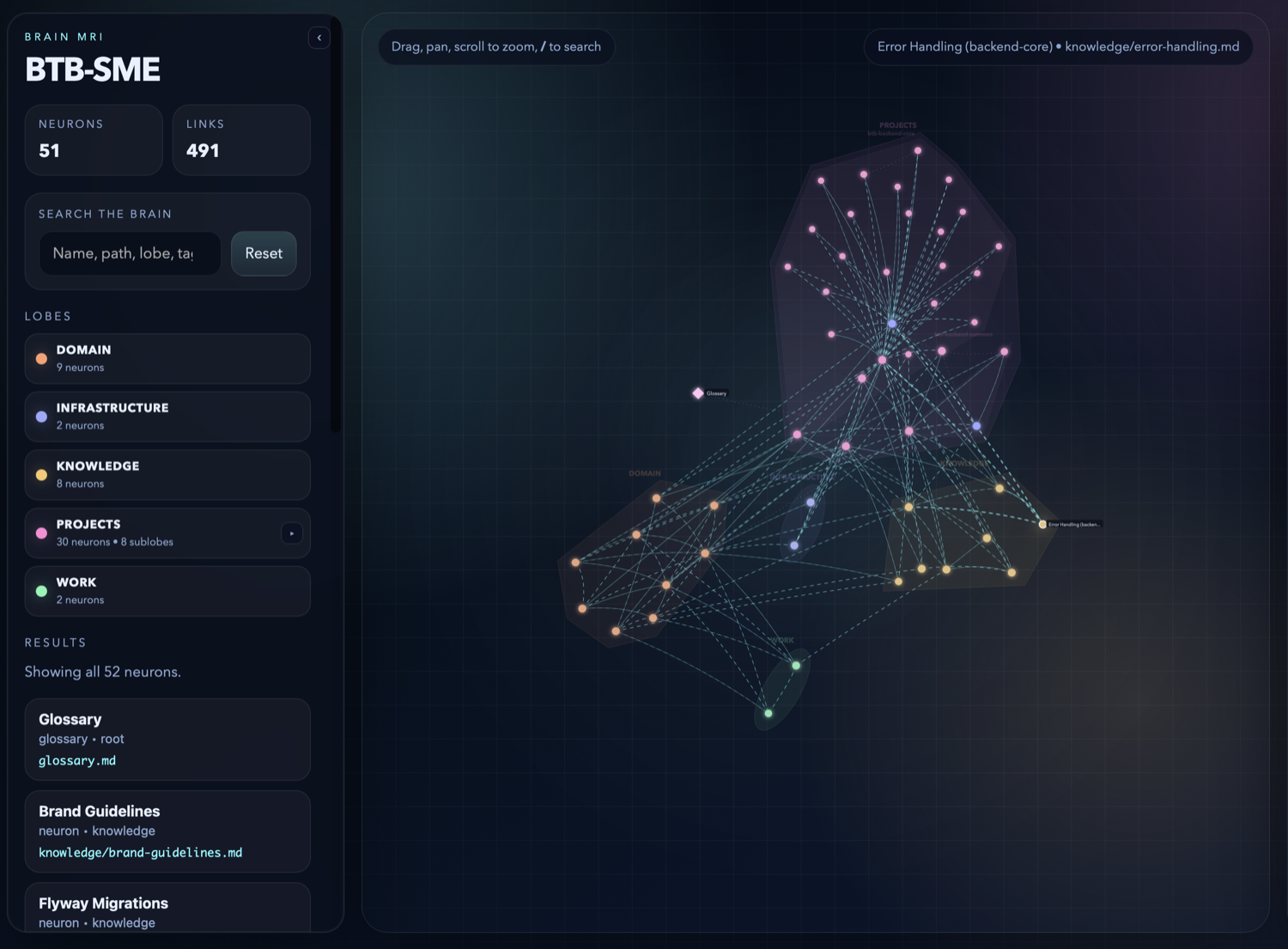
Live counts (51 neurons · 491 synapses), a lobe breakdown you can collapse and filter, and a fuzzy search across names, paths, lobes, and tags. Click a lobe to isolate it; click a node to open it.
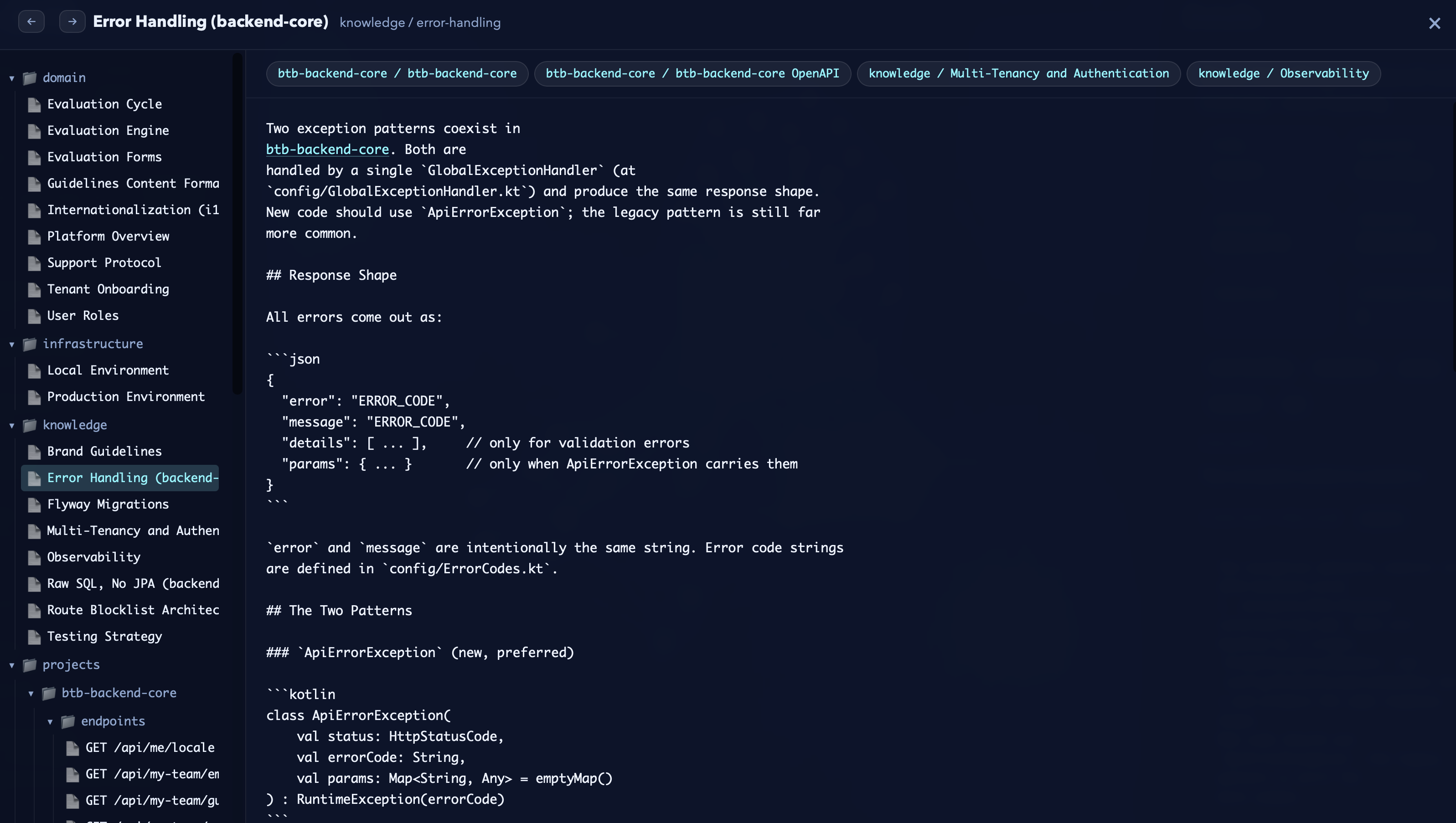
One click on any node opens its neuron, fully rendered, with related-neuron tabs across the top so you can walk a topic in seconds. This is what agents see — now visible to you.
The MRI is a single self-contained HTML file — no server, no account, no external calls. Run kluris mri, open it in any browser, and you've got the whole brain to explore.
It's a tool for three audiences at once: you (spot isolated neurons that should be cross-linked), your team (shared mental model of what we know), and new hires (five-minute onboarding instead of five days of spelunking). Since it's just HTML, you can commit it, email it, or drop it in Slack.
Lines between neurons are synapses — cross-links agents follow to load related context. Because the brain is a pre-digested snapshot, agents spend far fewer tokens orienting to a codebase than without one.

Beat 4 · Use
Every agent on your team can search and query across the brain. The agent shows you exactly which neurons it read — no hallucinations, no vibe.
> /kluris search auth flow projects/btb-core/auth-flow.md ★★★ knowledge/jwt-rotation.md ★★ infrastructure/keycloak-setup.md ★ Run `/kluris open auth-flow.md` to read one.
> /kluris what do we know about Docker? Reading: infrastructure/docker-builds.md infrastructure/environments.md You build multi-stage Dockerfiles with BuildKit. Images go to ghcr.io/zeespire/. Prod uses Coolify on Hetzner with Cloudflare Tunnel (zero public ports).
+ Pair · Specmint
Kluris is the brain. Specmint turns a feature request into a persistent spec built from deep research and iterative interviews. Use them together and the research phase starts half-done — grounded in your code and the knowledge your team already agreed to.
1 · Shorter research
Forge reads your repo and consults the brain. Decisions the team already made don't get re-discovered from the code.
2 · Sharper interviews
Not "what's your auth?" — but "your brain says Keycloak for cost — should GitHub OAuth live behind it as an IdP, or beside it?"
3 · Traceable decisions
Every entry in the resulting SPEC.md cites the neuron that backs it. A week later you can still tell why.
> /specmint-core:forge add OAuth sign-in with GitHub ● Reading src/auth/ (14 files) ● Reading config/GlobalExceptionHandler.kt ← the kluris bit ● /kluris what do we know about auth → knowledge/auth-decisions.md → projects/btb-core/auth-flow.md → knowledge/jwt-rotation.md Q1. Brain says you chose Keycloak for cost. Should GitHub OAuth live behind Keycloak as an IdP, or alongside it? Q2. Auth-flow neuron says refresh-at-80% TTL. Same cadence for the GitHub session? ✓ .specs/github-oauth-signin/SPEC.md ✓ 3 phases · 14 tasks · 4 decisions logged ✓ Every decision references a neuron
Enable Specmint Companions
specmint-core
Spec-firstResearch · Interview · Spec · Implement. The workflow shown above.
kluris companion add specmint-core
bundled with kluris
specmint-tdd
Red · Green · RefactorSame forge flow, with strict TDD — a failing test before any implementation.
kluris companion add specmint-tdd
bundled with kluris
Enable companions per brain; Kluris copies only the bundled SKILL.md and references it from the generated /kluris skill.
Beat 5 · Grow
Add lobes, add neurons, keep going — all through the agent.
> /kluris add a compliance lobe for SOC2 and GDPR notes compliance/ ✓ will create compliance/map.md ✓ will link into brain.md [a]pprove [c]ancel:
> /kluris remember that SOC2 audit evidence lives in the compliance-evidence/ bucket, rotated yearly compliance/soc2-evidence.md ────────────────────────────────────── # SOC2 audit evidence Evidence artifacts live in the `compliance-evidence/` S3 bucket. Rotation is annual. Access is restricted to the security team. ────────────────────────────────────── [a]pprove [e]dit [s]kip:
Lobes are folders, neurons are markdown files inside them — but you don't create them by hand. Ask the agent. It proposes the structure, shows you the diff, and writes it only after you approve. Nesting works the same way: "add a sublobe for the endpoints of acme-api" and the agent puts it in the right place.
Run kluris dream to regenerate maps and validate links after structural changes. Run kluris push to commit and share with your team. Have more than one brain? Each installs as /kluris-<name> and everything above works the same — see the appendix.
Beat 6 · Self-improve
Ask the agent to audit the brain. It reads across every neuron, spots connections you never wrote, and proposes new synapses — you approve each one before anything changes.
> /kluris review this brain and create more synapses Reading 34 neurons across 3 lobes... › projects/btb/auth-flow.md ↔ knowledge/jwt-rotation.md › infrastructure/docker-builds.md ↔ infrastructure/environments.md › knowledge/use-raw-sql.md ↔ projects/btb/reporting.md › projects/btb/import.md ↔ infrastructure/keycloak-setup.md ... 10 more projects/btb/auth-flow.md ────────────────────────────────────── --- title: Auth flow related: - ./clerk-vs-keycloak.md - ../knowledge/jwt-rotation.md (new) --- ────────────────────────────────────── [a]pprove all [o]ne-by-one [s]kip: o ✓ 12 applied · 2 skipped ✓ bidirectional links written ✓ maps regenerated
Grounded
The agent only proposes synapses between neurons that already exist — no hallucinated references.
Reviewed
You approve every change — one-shot, one-by-one, or skip — before anything is written to disk.
Compounding
Re-run it monthly. As the brain grows, the agent finds new patterns and your knowledge graph gets denser.
Reference
Kluris lives in two places. You run the CLI in your terminal to set up and maintain your brains. Your AI agents run one slash command — /kluris — inside Claude Code, Cursor, Windsurf, Codex, Copilot, Gemini CLI, Kilo, or Junie, followed by whatever you want to say. Keep the agent open on a project so it has code to read.
$ kluris <cmd>
Run in your shell — bash, zsh, fish, PowerShell. The purple $ prompt. Use it for install, setup, snapshots, git, and housekeeping.
> /kluris <pattern>
Run inside your AI coding agent — Claude Code, Cursor, Windsurf, Codex, Copilot, Gemini CLI, Kilo, Junie — with a project open. The pink > prompt. Use it while coding to teach and query the brain.
Run these in bash, zsh, fish, or PowerShell.
| create | Create a brain (interactive wizard) |
| clone <url> | Clone a brain from git |
| register <path|zip> | Register a brain already on disk, or extract a brain zip |
| list | List registered brains |
| status | Show brain tree and recent changes |
| search <query> | Ranked search across neurons, glossary, brain.md |
| wake-up | Compact snapshot for agent bootstrap |
| companion add | Enable an embedded companion for a brain |
| companion remove | Remove a companion opt-in |
| dream | Regenerate maps, fix links, validate |
| branch [name] | Show, switch, or create a git branch (--list) |
| push | Commit and push to the current branch |
| pull | Pull remote changes for the current branch |
| mri | Generate interactive HTML viz |
| remove <name> | Unregister a brain (keeps files) |
| doctor | Check prerequisites |
| help | Show command help |
All CLI commands support --json for machine-readable output.
Most users create and organize lobes and neurons by asking their AI agent, then run dream to refresh maps and links.
There's only one slash command — /kluris. Everything below is an example of what you can say after it.
Type these inside Claude Code, Cursor, Windsurf, Codex, Copilot, Gemini CLI, Kilo, or Junie — with a project open, so the agent can read your code. With one brain registered the slash command is /kluris; with multiple brains each installs as /kluris-<name>. Examples below use /kluris for clarity.
| /kluris learn <topic> | Agent analyzes code, proposes neurons |
| /kluris remember <fact> | Quick-capture a decision as a neuron |
| /kluris add a <name> lobe | Propose a new lobe, approve before it lands |
| /kluris add a sublobe for ... | Nest a lobe under an existing one |
| /kluris search <term> | Search the brain for a topic |
| /kluris what do we know about ... | Ask the brain a question |
| /kluris review this brain | Audit the brain, propose more synapses |
| /kluris create a decision | Create a decision record neuron |
| /kluris create an incident | Create an incident report neuron |
| /kluris create a runbook | Create a runbook neuron |
| /kluris open <file> | Open a neuron and read it |
| /kluris deprecate <file> | Mark a neuron as deprecated |
Agent patterns are free-form — say it naturally. The agent figures out the shape.
Appendix
A work brain, a personal brain, a team brain you cloned from GitHub — kluris keeps them separate. Each brain installs as its own slash command, so the agent never has to guess which one you mean.
$ kluris list acme-brain ~/Projects/acme-brain [git] personal ~/Projects/personal-brain [git] research ~/Projects/research-brain [no git] $ kluris status Multiple brains registered. Pick one: [1] acme-brain (~/Projects/acme-brain) [2] personal (~/Projects/personal-brain) [3] research (~/Projects/research-brain) [4] all 2 personal (personal) Lobes: 3, Neurons: 18 2026-04-05 tasks/today.md 2026-04-04 notes/q2-goals.md $ kluris clone git@github.com:acme/team-brain.git Cloning into ~/Projects/team-brain... ✓ Registered team-brain ✓ /kluris-team-brain skill installed across 8 agents $ kluris register ~/Downloads/archived-brain.zip Extracting to ~/archived-brain... ✓ Registered archived-brain ✓ /kluris-archived-brain skill installed across 8 agents
Free forever. Works with every AI agent on your team.
MIT licensed · Python 3.10+ · Works offline · All data is yours
Works with every agent on your team